 You Never Let Her Pay AI
One clear face
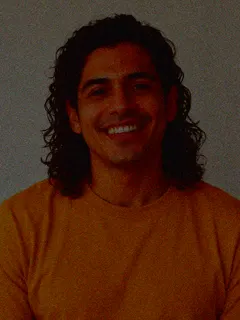
One person, face fully in view, from the chest up.
Photo guide
Your photo decides the face in the video. The scene has a wallet close-up and a long look at the lead's face, so a clear face matters more than a nice background.
Updated
One person, face fully in view, from the chest up.
Soft, even light with no hard shadows across the face.
Front-facing or a slight three-quarter view.
A neutral face or a light smile gives the model the most to work with. The scene supplies the embarrassment.
Masks, sunglasses and hats over the face confuse the model.
Crop to one person before you upload.
Beauty filters and cartoon styles lose the detail that makes a face recognizable.
You do not have to guess whether a photo is good enough. The free preview shows a still of your face in the scene before you sign in or pay.
If the preview does not look like the person, try a different photo rather than paying and hoping. Previews are limited per visitor, so pick your best photo first.
Use your own photo, or a photo of an adult who agreed to it. You confirm this before each video.
Do not upload photos of minors, celebrities, public figures, strangers or cartoon characters, and nothing sexual. Reported videos are reviewed and removed.
Upload one photo here and see your face in the scene for free. The full video is 12 seconds, vertical, with no subscription.
Add your photo



See a free preview before you pay · no sign-up
JPEG, PNG and WebP photos from your phone or computer. Large images are resized automatically.
Photo drafts are deleted after 24 hours. They go to the video provider only after you start generation.
Yes, if your friend is an adult and agreed to it. You confirm permission before each video.
No. The tool is for real adults who said yes to their photo being used.
youneverletherpay.net is an independent AI video service run by Taphold Studio, not affiliated with TikTok, CapCut or any creator of the meme. Every video is AI-generated. Upload only photos you are allowed to use.